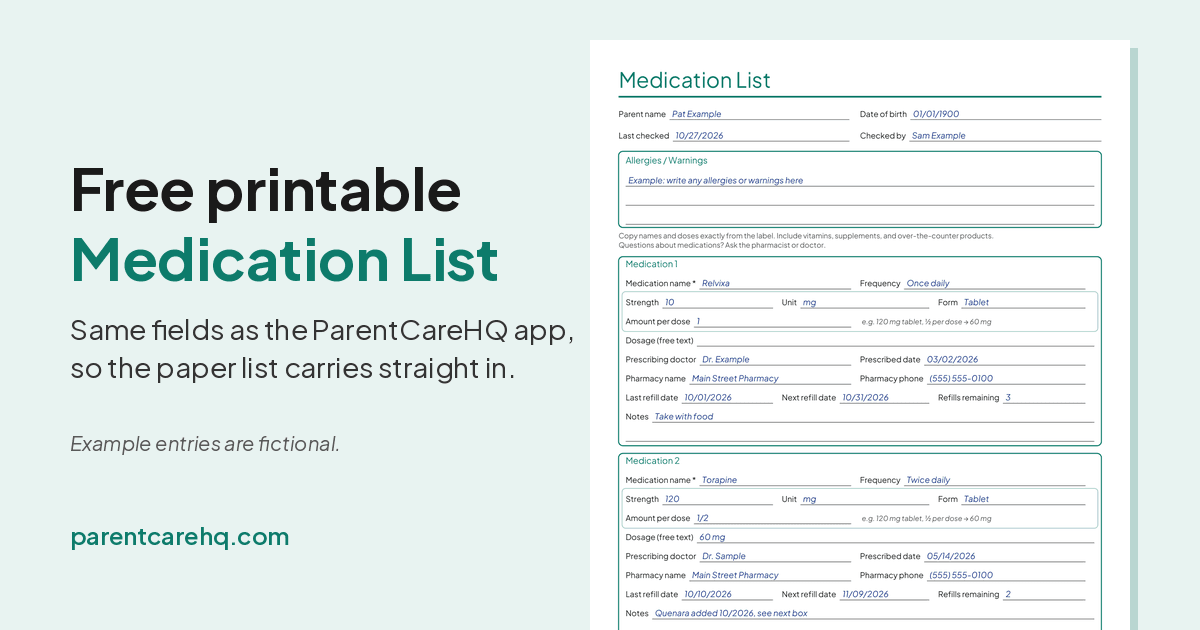
When a doctor, a pharmacist, or an ER nurse asks what your parent takes, the right answer is a piece of paper you can hand over, not a guess. A current medication list for an elderly parent (a simple medication list template is below) is one of the most useful things a family can keep, and one of the easiest to let slip out of date.
This page gives you a free printable medication list template, explains what goes on it, and shows how to keep it current. It isn't medical advice. Anything about which medications your parent should take, how much, or when is a question for their doctor or pharmacist. This is the organizing part.
The short version
- Download the template and print a few copies.
- Fill in one box per medication, copying the name, strength, and amount per dose exactly from the label. Include vitamins, supplements, and over-the-counter products.
- Write your parent's allergies at the top.
- Date it. Write a "last checked" date, and update it after every appointment, hospital stay, or pharmacy change.
- Make copies: one for your parent, one for you, and one for anyone else who might be the person at the hospital.
What to include on a medication list
A medication list should include each medication's name, how often it's taken, its strength, form, and amount per dose, along with the prescribing doctor, pharmacy, refill dates, and any notes, plus your parent's allergies at the top.
Each medication gets its own box on the template. The fields match the Medications section of the ParentCareHQ app, in the same order, so whatever you write on paper can be typed straight in later. Only the name is truly required. Fill in what you know and leave the rest blank until you can check.
- Medication name: exactly as it's printed on the label. If your parent takes a brand and you know the generic name, write both.
- Frequency: how often, and when, in plain words, such as "Twice daily" or "Once daily, morning."
- Strength and Unit: copied from the label, for example "120" and "mg." Don't round or guess.
- Form: such as tablet, as printed on the label.
- Amount per dose: how much of it is taken each time, for example "1/2" of a 120 mg tablet.
- Dosage (free text): optional if you've filled in strength and amount per dose. Use it if the label wording doesn't fit those boxes.
- Prescribing doctor: the doctor who prescribed it.
- Prescribed date: when it was started, if you know.
- Pharmacy name and Pharmacy phone: where it's filled. If different medications come from different pharmacies, note each one.
- Last refill date and Next refill date
- Refills remaining: it's printed on the label or the pharmacy receipt.
- Notes: anything else worth knowing, such as what the doctor said it's for or "take with food." If your parent stops taking a medication, write when and why here rather than just crossing it out.
At the top of the page there's one box for your parent's Allergies / Warnings: medications, foods, latex, and anything else, as listed in their medical records or by their pharmacist. There's also a line for their name, date of birth, the date you last checked the list, and who checked it.
Don't forget the things that don't feel like "medications." Vitamins, fish oil, sleep aids, antacids, pain relievers, eye drops, inhalers, and creams all count. Give each one its own box. These are often left off, and a pharmacist will want to know about them.
Not sure what's on the list? Ask your parent's pharmacist for a printout of their current prescriptions. It's a good starting point. Then walk through the medicine cabinet with your parent and add everything else.
Download the free medication list template (PDF)
Download the medication list template (PDF)
It's a two-page, letter-size PDF with an allergies box at the top and room for several medications per page. Print as many copies of page two as you need. It's free, and you don't need to sign up.
How to keep the list current
A medication list is only useful if it's right. An out-of-date list can be worse than none, because people trust it.
- Write a "last checked" date at the top every time you review it.
- Update it after every appointment. Ask at the end of each visit: "Did anything change with the medications today?"
- Update it after a hospital stay or ER visit. Discharge papers often list new, changed, or stopped medications. Copy those changes exactly as written. If anything is unclear, ask the pharmacist or the discharging doctor. (Our ER checklist covers what to bring and what to do after the visit.)
- Update it when a bottle looks different. A new pill shape or color can mean a different manufacturer, or a different medication. The pharmacist can tell you which.
- Never use the list to change a dose or stop a medication. The list records what the doctor ordered. Changes come from the doctor.
- Do a full review once or twice a year. Many pharmacies and doctors' offices will go through everything your parent takes, prescriptions and over-the-counter, if you bring the list and the bottles.
Who needs a copy
- Your parent: in a wallet or purse, and on the fridge
- You and your siblings: a photo on your phone at least, so whoever gets the call has it
- Their doctors: bring it to every appointment, especially with a new specialist
- Anyone who helps day to day: a home aide, a neighbor, or a family member who fills a pill organizer
- The hospital bag: put a copy with the rest of the items on our ER checklist
The hard part isn't making copies. It's keeping all of them the same after something changes.
Paper list vs. a shared digital list
Paper works, and plenty of families use it. The trouble is that copies drift. You update yours after the cardiology appointment, and your sister's photo from March is still on her phone.
That's the problem we built ParentCareHQ to solve. The Medications section uses the same fields as this template, in the same order, so you can type in your paper list once and keep one current list your care team can see. Add the Next refill date and ParentCareHQ reminds your care team a few days before, by email, push, or in the app, depending on each person's settings. When you're heading to an appointment, tap Print / Share list in the app. Each medication also appears on your parent's Emergency Card, along with their Allergies / Warnings, emergency contacts and primary care provider. You can print it with Print / Save PDF.
Have questions? The FAQ covers setup and sharing, and pricing is simple: 14 days free, no credit card. Family members join free.
Whichever you choose, start tonight. Print the template, sit down with your parent and the bottles, and fill in the first box. The rest gets easier from there.