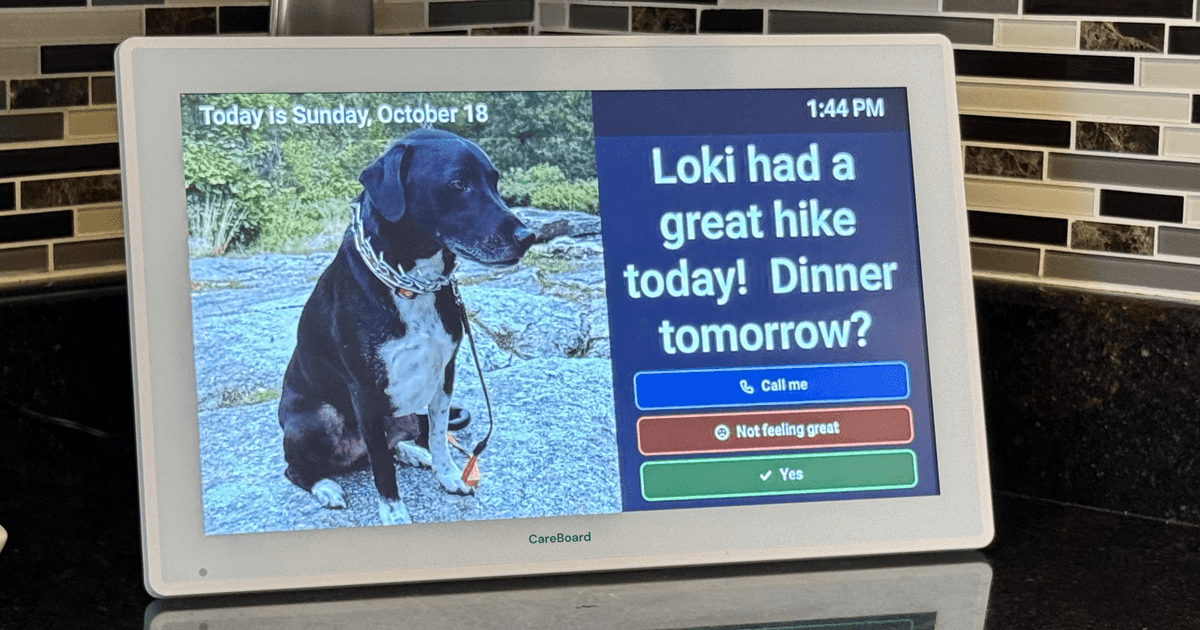
When a parent starts mixing up days, missing appointments, or calling to ask "is it Tuesday?", a lot of adult children land on the same idea: put a big, clear calendar on the wall. A digital calendar for elderly parents can do more than paper. It shows the right day, updates itself, and lets the care team change things from anywhere.
But the options vary a lot, and many are built for busy households, not for a parent who doesn't want another gadget. This guide covers what to look for, what to skip, and how to set one up so it actually gets used. It isn't medical advice. If memory or confusion is getting worse, start with your parent's doctor.
The short version
The best digital calendar for an elderly parent is one that:
- Your parent never has to set up or manage. The care team updates it from their own phones.
- Is easy to read across the room: large text, the day of the week spelled out, and high contrast.
- Shows only what matters today, not a crowded month grid.
- Stays on and plugged in, with no logins or menus for your parent.
- Has clear costs. Know what's free and what needs a subscription before you buy.
What to look for in a digital calendar for elderly parents
Big, clear "today"
The most useful thing a wall display does is answer "what day is it, and what's happening?" Look for the day of the week written out (not just a number), the date, and whether it's morning, afternoon, or evening. A full month view looks nice in a store photo, but it's a lot to take in.
Updated remotely by the care team
If the calendar only changes when someone is standing in front of it, it will drift out of date. Look for one the care team can update from their own phones, wherever they live. This matters most for long-distance families.
Nothing for your parent to manage
No passwords, no app store, no settings menus. Your parent should be able to glance at it, and maybe tap one big button. Everything else should be handled by the care team.
Easy to read
Check the screen size, text size, and brightness. Many families like a display that dims at night so it isn't a lamp in the bedroom. If your parent has low vision, bring the question to their eye doctor; they may have suggestions for contrast and size.
A way to reach back
A one-way calendar is useful. One where your parent can tap to say "I saw this" or "call me" is more useful, because the care team learns something.
Honest pricing
Some displays are a one-time purchase. Others need a monthly plan for key features. Read the fine print before you buy, especially for reminders.
Returns
Buying for someone else is a guess. A return window gives you time to see if your parent actually uses it.
What to skip
- Crowded screens. Weather, news, photos, and a month grid all at once is too much.
- Anything that needs your parent to log in or keep an app updated.
- Devices that only work on your home Wi-Fi setup unless someone can set it up in person at your parent's house.
- Promises that a gadget will keep your parent safe. A calendar is a helpful reminder, not a safety system, and it doesn't replace checking in.
How to set it up so it gets used
- Put it where your parent already looks: the kitchen, by the coffee maker, or near the chair they sit in.
- Start small. Add appointments and one or two daily reminders, then build up.
- Agree who updates it. One person owns the calendar, and others send changes to them, or everyone on the care team has access and knows the rules.
- Keep the source calendar in one place. The wall display should match the calendar the care team uses, so nothing gets entered twice.
- Check after a week. Ask your parent what they like and what's confusing, and adjust.
If your parent takes several medications, keep a current medication list alongside the calendar. Any question about what to take, or when, goes to their doctor or pharmacist, not the display.
Where CareBoard fits
We built CareBoard for this exact job. It's a home display for your parent that the care team manages from the ParentCareHQ app. Your parent sees messages, photos, and a daily check-in, and can tap to reply. When they tap the board, the right people on the care team get a notification in the ParentCareHQ app and on their phones.
- $299, shipping included in the contiguous U.S. You pay nothing until it ships.
- 30-day returns.
- The first run ships mid-November.
- No subscription required.*
Behind it, ParentCareHQ gives the care team one shared calendar that syncs to Google Calendar or Apple Calendar, so appointments live in one place.
*Messages, photos, replies and the daily check-in are free. Medication reminders and appointment reminders on the board need a ParentCareHQ plan ($9.99/mo or $99/yr; 14 days included with every board).
One more thing
A calendar on the wall works best alongside a plan for the bad day. Our ER checklist covers what to have ready if your parent ends up in the hospital. Set up the calendar on a quiet day, and keep the important papers in one place your care team can reach.