There's no single right answer to how often you should check on elderly parents. A parent who drives, sees friends, and manages their own appointments needs something very different from a parent who lives alone after a fall. What most families need isn't a number. It's a rhythm the whole care team agrees on, and a way to notice when it should change.
This guide walks through how to set that rhythm. It isn't medical advice. If you're worried about your parent's health, memory, or safety, talk with their doctor.
The short version
- Start with your parent. Ask how often they'd like to hear from you, and how.
- Match the rhythm to how they're doing, not to how worried you feel on a given day.
- Share it across the care team so it doesn't all land on one person.
- Mix quick check-ins with real visits. A daily "all good" text and a monthly visit do different jobs.
- Have a plan for a missed check-in, and agree on it before you need it.
A starting point for checking on elderly parents
These aren't rules. They're a place to start the conversation with your parent and the rest of the care team.
| How your parent is doing | A rhythm many families start with |
|---|---|
| Independent, active, sees people often | A call or two a week, plus regular visits |
| Living alone, mostly independent | A quick daily check-in, plus a longer call each week |
| Recent hospital stay, fall, or illness | Daily contact, more for the first weeks home, and a plan from the discharge team |
| Needs help with daily tasks | Daily contact from someone, plus a regular in-person schedule |
If you're not sure where your parent fits, their doctor can help you think it through.
Talk with your parent first
Checking in works better when it's something you do with your parent, not to them. Some questions to ask:
- How often would you like to hear from us?
- Do you prefer a call, a text, or a visit?
- What time of day is best?
- What should we do if we can't reach you?
Many parents worry about being a burden or being watched. A short, predictable check-in ("I'll text every morning at 9") often feels less intrusive than random worried calls.
Share the check-ins across the care team
When one sibling makes every call, it wears them out and the others stop knowing what's going on.
- Make a weekly schedule. Who calls on which days, and who visits when.
- Include people beyond family. A neighbor, a friend from church, or a paid caregiver can be part of the care team.
- Write down what you notice. A one-line note after each check-in ("sounded tired," "fridge was full") helps the next person.
- Keep one place for updates instead of five group texts.
What to notice when you check in
A check-in is a chance to see how things are going, not to quiz your parent. Over time, watch for changes such as:
- Mail or bills piling up
- Less food in the house, or spoiled food
- Missed appointments or confusion about days
- Medications that seem to be running out early or late
- Changes in mood, hygiene, or the state of the house
If you notice something, write it down and share it with the care team. If it's about health, memory, or medications, bring it to your parent's doctor or pharmacist. A current medication list makes those conversations much easier.
Have a plan for a missed check-in
Decide now what happens if your parent doesn't answer. For example: try again in 30 minutes, then call a neighbor who has a key, then call for help if nobody can reach them. Write the plan down and make sure everyone on the care team knows it. Keep emergency contacts and documents ready too; our ER checklist covers what to have on hand.
When to change the rhythm
Revisit the schedule after any big change: a fall, a hospital stay, a new diagnosis, a move, or the loss of a spouse. It's also worth a check every few months even when things seem fine. Increasing check-ins for a while isn't a failure. It's what a care team does.
Where ParentCareHQ fits
You can run all of this with a group text and a spreadsheet. We built ParentCareHQ to keep it in one place. ParentCareHQ gives you one shared calendar for the care team that syncs to Google Calendar or Apple Calendar, so visits and calls are easy to split up. Refill reminders go to the care team a few days before (3 by default), by email, push, and in the app, based on each person's notification settings. And the AI care assistant answers questions from what you've already entered, so the sibling who missed last week's call can catch up fast.
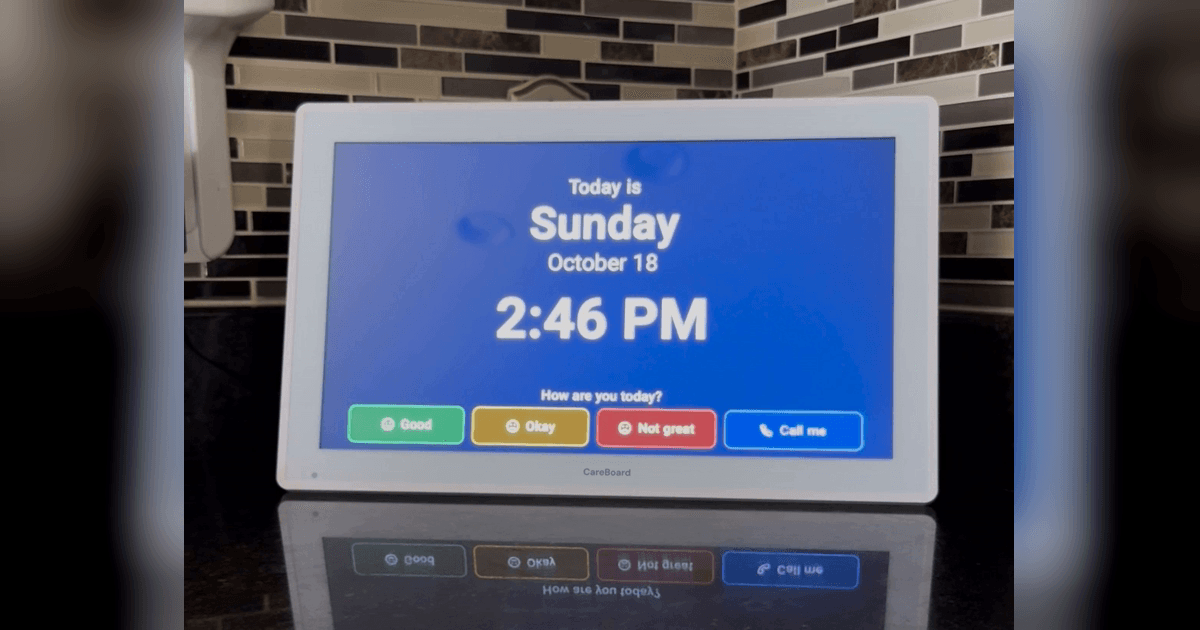
If your parent would rather not use a phone, CareBoard is a home display with a daily check-in they can tap. When they tap the board, the right people on the care team get a notification in the ParentCareHQ app and on their phones.
Family members join free. Start your 14-day free trial, no credit card needed.